| Version 112 (modified by , 3 years ago) ( diff ) |
|---|
-
Gateworks System Controller (GSC)
- GSC versions
-
GSC Registers
- GSC_CTRL_0 (Register R0): Pushbutton Switch, CRC, and Tamper Switch …
- GSC_CTRL_1 (Register R1): Sleep Wakeup Timer Control
- GSC_SLEEP_WAKE_TIME (Registers R2-R5): Sleep Wakeup Time
- GSC_SLEEP_ADD (Registers R6-R9): Sleep Wakeup Time Additive
- GSC_INTERRUPT_STATUS (Register R10): Interrupt Source
- GSC_INTERRUPT_ENABLE (Register R11): Interrupt Enable (refer to bits above)
- GSC_FIRMWARE_CRC (Register R12,R13): GSC Firmware CRC Value
- GSC_FIRMWARE_VER (Register R14): GSC Firmware Version
- GSC_WRITE_PROTECT (Register R15): Write Protection
- GSC_RESET_CAUSE (Register R16): Reset Cause
- GSC_INTERRUPT_STATUS_1 (Register R17): Interrupt Source 1
- GSC_INTERRUPT_ENABLE_1 (Register R18): Interrupt Enable 1
- GSC_THERMAL_PROTECT (Register R19): Thermal Protection Configuration
- GSC_BOOT_OPTIONS (Register R21): Boot Control Options
- GSC_MEM_ACCESS_PAGE (Register R22): Direct Memory Access Page Number
- GSC_CTRL_2 (Register R23): Pushbutton, Miscellaneous Configuration
- GSC_POWER_CONTROL (Register R25): Power Control
- GSC_SOFT_POWER_TIME (Register R26): Soft Power Press Time
- GSC_REGISTER_BACKUP (Register R31): Register Backup Control
- Real Time Clock
- System Temperature and Voltage Monitor
- Battery Voltage Reading
- Fan Controller
- General Purpose Input and Output (GPIO)
- User Pushbutton
- EEPROM storage
- Hardware Sleep and Wake
- Alternate Boot Device
- Tamper Detection
- GPS Active Antenna short-circuit auto detect and recover
- GSC Reset Cause (GSCv3 firmware v53+)
- GSC Thermal Protection (GSCv3 firmware v53+)
- GSC Interrupts
- Hardware Boot Watchdog
- Register Save/Load (GSCv3 firmware v57+)
- I2C communication with the GSC
- GSC Drivers
- Reset Monitor
- GSC Updates
- Battery / Battery Replacement
Gateworks System Controller (GSC)
The Gateworks System Controller (GSC) is a device present across various Gateworks product families that provides a set of system related features. Refer to the board hardware user manuals to see what features below are present:
- Real Time Clock (RTC)
- System voltage/temperature monitoring
- Software controllable Fan controller (6 temperature setpoints)
- General Purpose Input / Output (GPIO) expansion
- Software Configurable User Push-Button
- EEPROM storage
- Software Configurable Deep Sleep with RTC Wakeup
- Alternate Boot device selection and auto-selection
- Tamper detection
- GPS Active Antenna short-circuit auto-detect and recover
- Hardware Boot Watchdog
- Reset Monitor
- Software field-upgradable firmware
The GSC communicates with the host CPU over the i2c bus and uses the following 7-bit i2c slave addresses:
| Address | Name | Description |
|---|---|---|
| 0x20 | GSC configuration registers | RAM based registers that can be saved/loaded |
| 0x21 | GSC software update registers | i2c based update mechanism |
| 0x23 | PCA9555 emulated I/O | Common industry standard GPIO port expander |
| 0x29 | System monitor | Similar to industry standard AD7418 but with modified register set |
| 0x50 | 24c04 emulated EEPROM | Common industry standard 256B EEPROM device |
| 0x51 | 24c04 emulated EEPROM | Common industry standard 256B EEPROM device |
| 0x52 | 24c04 emulated EEPROM | Common industry standard 256B EEPROM device - some models only |
| 0x53 | 24c04 emulated EEPROM | Common industry standard 256B EEPROM device - some models only |
| 0x5e | Direct memory access register | Supports reads only |
| 0x68 | DS1672 emulated RTC | Common industry standard device |

GSC versions
The latest Gateworks products use a third generation GSC. The following generations exist:
| Family | Board | GSC version |
|---|---|---|
| Venice | all | v3 |
| Newport | all | v3 |
| Ventana | GW5910/GW5913 | v3 |
| Ventana | GW51xx/GW52xx/GW53xx/GW54xx/GW55xx | v2 |
The various generations of GSC versions are:
- v1: MSP430F2132
- v2: MSP430F2252
- additional RAM/FLASH space (additional user eeprom regions)
- additional ADC
- added FAN controller
- added Alternate boot device support
- v3: MSP430FR58471
- additional RAM/FLASH space
- additional ADC
- improved I2C interface (eliminates occasional I2C NAK's)
- reduced power consumption resulting in longer battery life (3.8Y -> 5Y)
- resolves 'high power draw state' when inserting a battery while board powered off
GSC Registers
The System Specialized Functions described below are configured via a set of GSC registers in an i2c slave device at the 7-bit address of 0x20.
GSC Registers:
| Reg Number | Reg Name | Description | Supported |
|---|---|---|---|
| 0 | GSC_CTRL_0 | Pushbutton Switch, CRC, Tamper Switch | All |
| 1 | GSC_CTRL_1 | Sleep / Wakeup Control, Alternate Boot Device | All |
| 2-5 | GSC_SLEEP_WAKE_TIME | Sleep Wakeup Timer | All |
| 6-9 | GSC_SLEEP_ADD | Sleep Wakeup Additive Timer | All |
| 10 | GSC_INTERRUPT_STATUS_0 | Interrupt Source | All |
| 11 | GSC_INTERRUPT_ENABLE_0 | Interrupt Enable | All |
| 12-13 | GSC_FIRMWARE_CRC | Firmware CRC Value | All |
| 14 | GSC_FIRMWARE_VER | Firmware Version | All |
| 15 | GSC_WRITE_PROTECT | Write Protection | All |
| 16 | GSC_RESET_CAUSE | Reset Cause | GSCv3 |
| 17 | GSC_INTERRUPT_STATUS_1 | Interrupt Source 1 | GSCv3 |
| 18 | GSC_INTERRUPT_ENABLE_1 | Interrupt Enable 1 | GSCv3 |
| 19 | GSC_THERMAL_PROTECT | Thermal Protection | GSCv3 |
| 21 | GSC_BOOT_OPTIONS | Boot Control Options | GSCv3 |
| 22 | GSC_MEM_ACCESS_PAGE | Direct Memory Access Page Number | GSCv3 |
| 23 | GSC_CTRL_2 | Pushbutton Switch, Misc. | GSCv3 |
| 25 | GSC_POWER_CONTROL | Power Configuration | GSCv3 |
| 26 | GSC_SOFT_POWER_TIME | Soft Power Press Time | GSCv3 |
| 31 | GSC_REGISTER_BACKUP | Register Backup Control | GSCv3 |
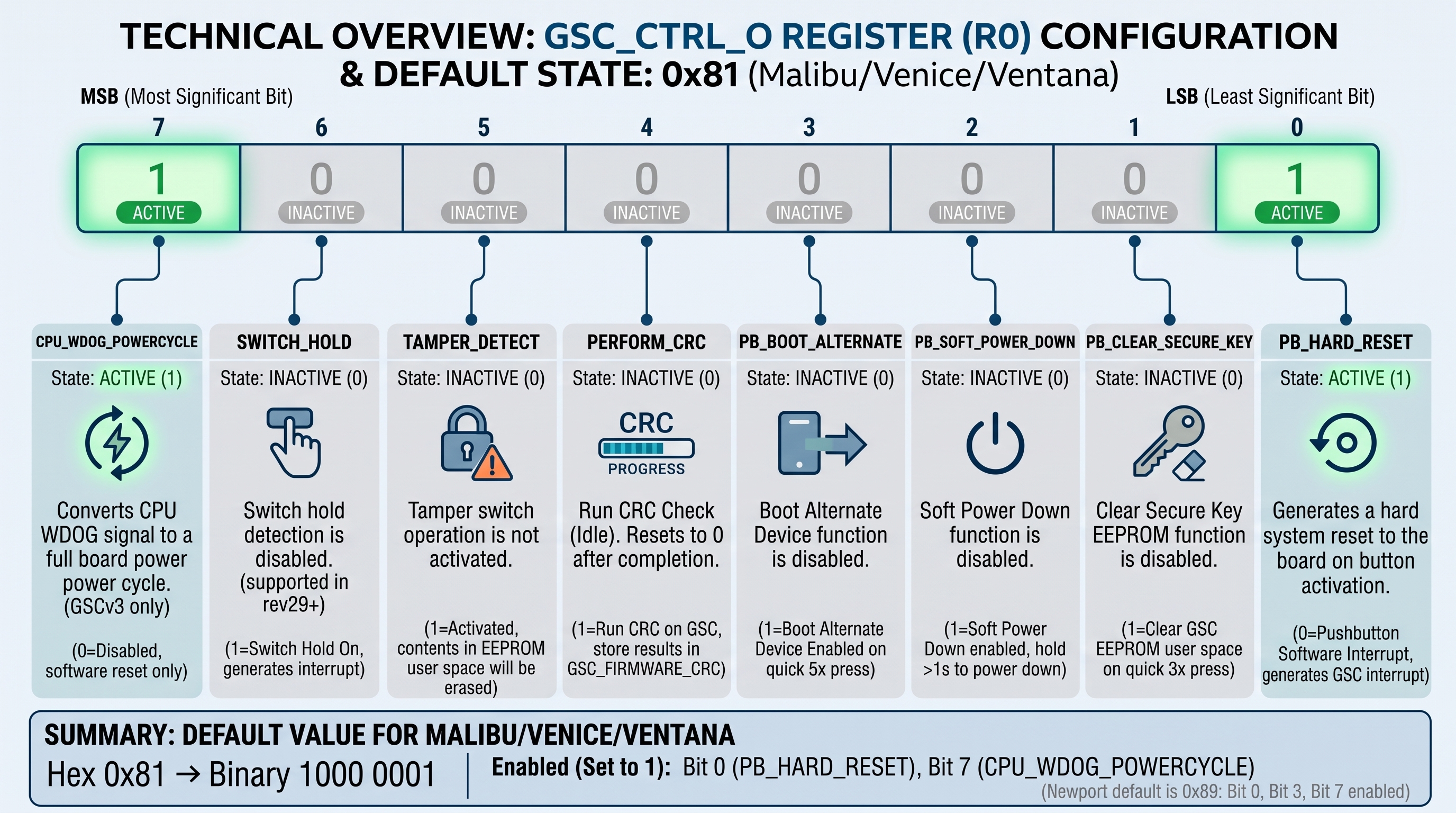
GSC_CTRL_0 (Register R0): Pushbutton Switch, CRC, and Tamper Switch configuration
| Bit | Name | Description | Newport Defaults | Ventana Defaults |
|---|---|---|---|---|
| 0 | PB_HARD_RESET | 0 = Pushbutton Software Interrupt Generates GSC Interrupt (see R10.0/R11.0) 1 = Push button generates hard system reset to board when the button is activated and de-activated within 700ms | Enabled | Enabled |
| 1 | PB_CLEAR_SECURE_KEY | 0 = Clear Secure Key EEPROM disabled 1 = Clear GSC EEPROM user space when switch is activated three times with less than 700ms delay between each activation Generates GSC Intterupt | Disabled | Disabled |
| 2 | PB_SOFT_POWER_DOWN | 0 = Soft Power Down disabled 1 = Soft Power Down enabled Hold down >1s to power down When powered down a momentary press will power up Generates push button interrupt | Disabled | Disabled |
| 3 | PB_BOOT_ALTERNATE | 0 = Boot Alternate Device disabled. 1 = Boot Alternate Device Enabled The board will reset and boot from the Alternate Boot Device when the pushbutton is activated (quick press-and-release) 5 times in quick succession) | Enabled | Disabled |
| 4 | PERFORM_CRC | 1 = Run CRC on GSC and store results in GSC_FIRMWARE_CRC (R12-R13) resets to 0 on completion of CRC | Disabled | Disabled |
| 5 | TAMPER_DETECT | 0 = Do not activate tamper switch operation 1 = Activate tamper switch operation. When Activated, if the tamper switch is released, the contents in the EEPROM user space will be erased Generates tamper switch interrupt. | Disabled | Disabled |
| 6 | SWITCH_HOLD | 0 = Switch hold disabled. 1 = Switch Hold On. When the switch is held down for >700ms an interrupt will be generated. See interrupt Enable / Status registers. (supported in rev29+) | Disabled | Disabled |
| 7 | CPU_WDOG_POWERCYCLE | 0 = Disabled. CPU WDOG signals only trigger a software reset. 1 = Enabled. Convert CPU WDOG signal into a full board power cycle. (GSCv3 only) | Enabled | Not supported |
GSC_CTRL_1 (Register R1): Sleep Wakeup Timer Control
| Bit | Name | Description |
|---|---|---|
| 0 | SLEEP_ENABLE | 0 = Disable hardware sleep operation 1 = Enable hardware sleep operation |
| 1 | ACTIVATE_SLEEP | 0 = Do not activate hardware sleep operation 1 = Activate hardware sleep operation (see GSC_SLEEP_WAKE) |
| 2 | LATCH_SLEEP_ADD | 0 = Reserved 1 = Latch and add GSC_SLEEP_ADD registers to GSC_SLEEP_WAKE Resets to Zero on Completion |
| 3 | SLEEP_NOWAKEPB | 0 = Wake from sleep on pushbutton 1 = do not wake on sleep until sleep wakeup time |
| 4 | RESERVED | |
| 5 | RESERVED | |
| 6 | SWITCH_BOOT_ENABLE | 0 = Auto Switch boot disabled 1 = Auto Switch boot enabled Note this is set and used at powerup by the GSC as a boot watchdog on Ventana boards |
| 7 | SWITCH_BOOT_CLEAR | Auto Switch boot clear Set to disable auto switch boot countdown timer Note this is set and used at bootup by the bootloader as a boot watchdog on Ventana boards |
GSC_SLEEP_WAKE_TIME (Registers R2-R5): Sleep Wakeup Time
| Bit | Description |
|---|---|
| 0-31 | RTC Value to wake the board when in sleep (least significant byte first) |
GSC_SLEEP_ADD (Registers R6-R9): Sleep Wakeup Time Additive
| Bit | Description |
|---|---|
| 0-31 | Add to current RTC and store in GSC_SLEEP_WAKE_TIME latched with R1.2 (least significant byte first) |
GSC_INTERRUPT_STATUS (Register R10): Interrupt Source
The GSC includes a single active-low level-triggered interrupt connected to an interrupt input on the ARM host processor. The GSC includes several possible interrupt sources with a control register to enable the desired interrupts and a status register to determine which are active. The following bits will indicate the cause of the host interrupt assertion which will remain asserted until all enabled bits are clear.
Note: These bits will be cleared automaticly by the driver
| Bit | Name | Description |
|---|---|---|
| 0 | IRQ_PB | When set a pushbutton switch interrupt has occurred |
| 1 | IRQ_KEY_ERASED | When set a Secure Key erase operation has completed |
| 2 | IRQ_EEPROM_WP | When set an EEPROM WP violation occurred (write to EEPROM while GSC_EEPROM_WP_ALL or GSC_EEPROM_WP_BOARDINFO was enabled) |
| 3 | Reserved | |
| 4 | IRQ_GPIO_CHANGE | When set a GPIO interrupt has occurred |
| 5 | IRQ_TAMPER_DETECT | When set a tamper switch interrupt has occurred |
| 6 | IRQ_WDOG_TIMEOUT | When set a boot watchdog timeout has occurred resulting in the board being reset |
| 7 | IRQ_SWITCH_HOLD | When set a 'switch hold' interrupt has occurred |
For more information see gsc-interrupts
GSC_INTERRUPT_ENABLE (Register R11): Interrupt Enable (refer to bits above)
| Bit | Name | Description |
|---|---|---|
| 0 | IRQ_PB | Set to enable pushbutton switch interrupt |
| 1 | IRQ_SECURE_KEY_ERASED | Set to enable Secure Key erase operation interrupt |
| 2 | IRQ_EEPROM_WP | Set to enable EEPROM WP violation interrupt |
| 3 | Reserved | |
| 4 | IRQ_GPIO_CHANGE | Set to enable GPIO interrupt |
| 5 | IRQ_TAMPER_DETECT | Set to enable Tamper detect interrupt |
| 6 | IRQ_WDOG_TIMEOUT | Set to enable Boot Watchdog timeout interrupt |
| 7 | IRQ_SWITCH_HOLD | Set to enable pushbutton switch 'hold' interrupt |
For more information see gsc-interrupts
Note that you should not be altering this register if you are using the Linux GSC driver as it will enable the interrupts according to other drivers that register handlers for them. Enabling interrupt sources that have no handlers will result in interrupt storms.
GSC_FIRMWARE_CRC (Register R12,R13): GSC Firmware CRC Value
| Bit | Description |
|---|---|
| 0-15 | Contains the 16-bit cyclic redundancy check value for the GSP Flash memory (least significant byte first) The GSC performs a CRC check when R0.4 is set Once R0.4 is clear, R12 and R13 (16-bit lsb) contain an accurate CRC. |
GSC_FIRMWARE_VER (Register R14): GSC Firmware Version
| Bit | Description |
|---|---|
| 0-7 | Contains the GSC firmware version number |
GSC_WRITE_PROTECT (Register R15): Write Protection
| Bit | Name | Description |
|---|---|---|
| 0 | GSC_EEPROM_WP_ALL | 1 = Write Protect all EEPROM regions |
| 1 | GSC_EEPROM_WP_BOARDINFO | 1 = Write Protect the reserved Gateworks Board Info EEPROM section |
| 2 | Reserved | - |
| 3-7 | GSC_WP_PASSWD | Must be 0xB when altering bits[0:2] (ie write 0x59 (0xB<<3|0x1) to enable WP_ALL) |
Examples:
i2cset -f -y 0 0x20 0xf 0x5a # enable WP_BOARDINFO (0xb<<3|0x2)
i2cset -f -y 0 0x20 0xf 0x59 # enable WP_ALL (0xb<<3|0x1)
i2cset -f -y 0 0x20 0xf 0x58 # disable WP (0xb<<3|0x0)
Note that by default WP_BOARDINFO is enabled on Newport and Venice GSC's.
GSC_RESET_CAUSE (Register R16): Reset Cause
Supported on GSCv3 firmware v53+, the GSC_RESET_CAUSE register describes the event that caused the boards power supply to be reset by the GSC. This register is read by up to date Newport and Venice boot firmware and displays an ASCII flag representation. See the reset cause section for more detail.
NOTE: This table represents "Values" not "bits".
| Value | Name | ASCII Flag | Description |
|---|---|---|---|
| 0 | RST_CAUSE_VIN | VIN | Board power was cycled externally; no reset |
| 1 | RST_CAUSE_PB | PB | User pushbutton |
| 2 | Reserved | - | - |
| 3 | RST_CAUSE_CPU | CPU | CPU watchdog |
| 4 | RST_CAUSE_TEMP_LOCAL | TEMP_L | Board Temperature exceeded spec |
| 5 | RST_CAUSE_TEMP_REMOTE | TEMP_R | CPU Temperature exceeded spec |
| 6 | RST_CAUSE_SLEEP | SLEEP | GSC woke board from sleep |
| 7 | RST_CAUSE_BOOT_WDT | BOOT_WDT1 | Boot watchdog |
| 8 | RST_CAUSE_BOOT_WDT_MANUAL | BOOT_WDT2 | User pushbutton 5x to toggle boot device |
| 9 | RST_CAUSE_SOFT_PWR | SOFT_PWR | Button press from soft power control |
For other information about reset cause see our FAQ.
GSC_INTERRUPT_STATUS_1 (Register R17): Interrupt Source 1
Supported on GSCv3 firmware v53+.
| Bit | Name | Description |
|---|---|---|
| 0 | GSP_IRQ_OVRTMP_LOCAL | When set the local temp rose above CRIT_BOARD_TEMP |
| 1 | GSP_IRQ_OVRTMP_REMOTE | When set the remote temp sensor asserted its ALERTJ signal |
GSC_INTERRUPT_ENABLE_1 (Register R18): Interrupt Enable 1
Supported on GSCv3 firmware v53+.
| Bit | Name | Description |
|---|---|---|
| 0 | GSP_IRQ_OVRTMP_LOCAL | Set to enable the local temp rose above CRIT_BOARD_TEMP interrupt |
| 1 | GSP_IRQ_OVRTMP_REMOTE | Set to enable the remote temp sensor asserted ALERTJ signal interrupt |
GSC_THERMAL_PROTECT (Register R19): Thermal Protection Configuration
Supported on GSCv3 firmware v53+, the GSC_THERMAL_PROTECT register configures the thermal protection feature.
| Bit | Name | Description |
|---|---|---|
| 0 | GSC_TP_ENABLE | 1 = Enable Thermal protection |
| 1 | RESERVED | |
| 2 | RESERVED | |
| 3-7 | GSC_TP_LIMIT | Max temp limit additive value. This value is multiplied by 2, then added to 70C. Valid values are 0x01-0x1a resulting in a range of 72-122C |
See #thermal-protection for more details
GSC_BOOT_OPTIONS (Register R21): Boot Control Options
Supported on GSCv3 firmware v57+.
| Bit | Name | Description |
|---|---|---|
| 0 | GSC_SWITCH_BOOT_SELECT | Boot device select. Clear for primary, set for alt device. This bit is also controlled by the user pushbutton 5x press behavior. |
GSC_MEM_ACCESS_PAGE (Register R22): Direct Memory Access Page Number
Supported on GSCv3 firmware v57+.
| Bit | Name | Description |
|---|---|---|
| 0-7 | GSC_PAGE_NUMBER | Page address offset when direct reading the GSC flash |
This API which is implemented over I2C on address 0x5f allows a user to do direct memory reads over the entirety of the accessible memory range (0x0000-0xFFFF). It is used by constructing a 16 bit address with the top byte (a.k.a. page) being set by writing to an undocumented register at address 0x20 offset 0x1f. The bottom byte is then added on via standard I2C protocol. Memory writes are not supported with this API. In order to simplify the usage of this feature, a bash script was created and can be found as an attachment to this wiki page gsc_direct_mem.sh.
GSC_CTRL_2 (Register R23): Pushbutton, Miscellaneous Configuration
Supported in GSCv3 firmware v58+.
| Bit | Name | Description |
|---|---|---|
| 0 | GSC_10X_PRESS_DISABLE | Disable 10x press for loading FACTORY registers (see register backup) |
| 1 | GSC_SOFT_WAKE_PROTECT | Disable waking from soft power press if VIN below board preset minimum |
GSC_POWER_CONTROL (Register R25): Power Control
Supported in GSCv3 firmware v63+. This register controls various power configuration details.
| Bit | Name | Description |
|---|---|---|
| 1 | GSC_POWER_SUPERVISOR_ENABLE | 1=Enable voltage supervisor 0=Disable voltage supervisor |
When enabled the voltage supervisor will cause the GSC to reset when the battery voltage drops below 1.85V to 1.80V. When disabled the GSC may remain powered down to a lower battery voltage but in some cases a battery value between 1.8V and 0.66V can result in a board in the GSC 'sleep' state to not be able to wake the board back up until the battery drops below 0.66V.
Newer hardware has an independent power supply to the GSC allowing the GSC to be powered from Vin to avoid the potential risk that a GSC sleep with a low battery can end up in a stuck state.
GSC_SOFT_POWER_TIME (Register R26): Soft Power Press Time
Supported in GSCv3 firmware v58+. This register controls how long (in seconds) the pushbutton must be depressed before the board turns on/off via soft power control. The register is composed of an upper and lower nibble that control the minimum power on and power off press times respectively. The register defaults to a power on press time of 0 seconds and a power off press time of 1 second (0x01).
| Bit | Name | Description |
|---|---|---|
| 0-3 | GSC_SOFT_POWER_TIME_OFF | Minimum pushbutton press time required to sleep, in seconds |
| 4-7 | GSC_SOFT_POWER_TIME_ON | Minimum pushbutton press time required to wake, in seconds |
Examples:
i2cset -f -y 0 0x20 0x1a 0x01 # hold >1 second to sleep, and >0 seconds to wake (default)
i2cset -f -y 0 0x20 0x1a 0x11 # hold >1 second to sleep, and >1 second to wake
i2cset -f -y 0 0x20 0x1a 0x25 # hold >5 seconds to sleep, and >2 seconds to wake
- Note that if you set the GSC_SOFT_POWER_TIME_OFF to 0 for >0 seconds it will take precidence over any button pres-and-release events so the board will power down within a second of holding the button down and thus disable any ability for a 1x button press-and-release event to be used.
GSC_REGISTER_BACKUP (Register R31): Register Backup Control
Supported on GSCv3 firmware v57+. This register has an upper nibble password of value 0xA0 that should be bitwise OR'd with an enumerated value in the lower nibble that will be interpreted as the command. This register will self clear when the operation has completed. See the below Register Save/Load section for more information.
| Bit | Name | Description |
|---|---|---|
| 1 | GSC_REG_BKP_SAVE | Save current register values to USER backup area |
| 2 | GSC_REG_BKP_USER_LOAD | Load register values from USER backup |
| 3 | GSC_REG_BKP_FACTORY_LOAD | Load register values from FACTORY backup |
| 4-7 | GSC_REG_BKP_PASSWORD | Password for upper nibble (0xA0). Bitwise OR this value with lower nibble enumerated values described above
|
Real Time Clock
The GSC contains a Real Time Clock (RTC) which emulates a Dallas Semiconductor DS1672, or equivalent. The RTC is battery backed to retain time information when SBC power is removed. The I2C address for the RTC is 0x68. The RTC is compatible with the standard Linux ds1672 RTC driver and thus works with the standard Linux RTC device API. The RTC device will be /dev/rtc0 and adheres to the standard ioctl and sysfs API's.
The most common Linux RTC commands are (refer to the linux man pages for more info on the commands and the available time/date formats):
- Write System Time and Date from Console:
date #time and date you would like to write - Write Real Time Clock Time and Date from System Time:
hwclock -w
- Read Time and Date from System Time:
date
- Read Time and Date from Real Time Clock:
hwclock -r
- Example: Set the system time to a specific date, then set the RTC from that date, then read the RTC:
> date -s 201303041744.42
Mon Mar  4 17:44:42 UTC 2013
> hwclock -w
> hwclock -r
Mon Mar  4 17:44:47 2013  0.000000 seconds
Note that typical Linux based systems use a Real Time Clock as such:
- on system boot, the hardware clock (RTC) sets the time of the system clock (the system clock ticks based on the CPU's timer). This is typically done in an init script using
hwclockbut sometimes can be done from an RTC kernel driver (which is the case for the GSC RTC supported by the ds1672 driver - upon driver init, the system time will be set from the GSC RTC) - a Network Time Protocol (NTP) client runs in the background and periodically updates the system clock (not the hardware RTC) based on the time of an Internet Time Server
- on system shutdown (ie, a 'clean' or 'user prompted' shutdown) the system will set the RTC value from the system clock (because it is assumed that a system clock sync'd with an Internet Time Server is more accurate than an RTC). This is typically done in a shutdown init script.
- Note that none of the above may be typical of an Embedded Linux OS
System Temperature and Voltage Monitor
The GSC implements system voltage and temperature monitoring (similar to industry standard AD7418) at i2c slave address 0x29. For each analog to digital converter (ADC) input, the value can be read at a register offset. The register mapping differs depending on the version of the GSC:
GSCv3 (GW7xxx/GW6xxx/GW5910/GW5913)
The following 16-bit registers (MSB first, LSB second) are available:
system monitor registers:
| Name | Register | Note |
|---|---|---|
| Board Temp | 0x06 | Deg C/10 |
| VBatt | 0x08 | Volts/1000 |
| FAN0 | 0x0A | Fan setpoint 0 1 |
| FAN1 | 0x0C | Fan setpoint 1 1 |
| FAN2 | 0x0E | Fan setpoint 2 1 |
| FAN3 | 0x10 | Fan setpoint 3 1 |
| FAN4 | 0x12 | Fan setpoint 4 1 |
| FAN5 | 0x14 | Fan setpoint 5 1 |
| FAN_TACH | 0x16 | FAN TACH pulses per second |
| ADC A0 | 0x80 | Raw ADC value 2 |
| ADC A1 | 0x82 | Raw ADC value 2 |
| ADC A2 | 0x84 | Raw ADC value 2 |
| ADC A3 | 0x86 | Raw ADC value 2 |
| ADC A4 | 0x88 | Raw ADC value 2 |
| ADC A5 | 0x8A | Raw ADC value 2 |
| ADC A6 | 0x8C | Raw ADC value 2 |
| ADC A7 | 0x8E | Raw ADC value 2 |
| ADC A8 | 0x90 | Raw ADC value 2 |
| ADC A9 | 0x92 | Raw ADC value 2 |
| ADC A10 | 0x94 | Raw ADC value 2 |
| ADC A11 | 0x96 | Raw ADC value 2 |
| ADC A12 | 0x98 | Raw ADC value 2 |
| ADC A13 | 0x9A | Raw ADC value 2 |
| ADC A14 | 0x9C | Raw ADC value 2 |
| ADC A15 | 0x9E | Raw ADC value 2 |
| ADC A30 | 0xA0 | Raw ADC value 2 |
| ADC A31 | 0xA2 | Raw ADC value 2 |
- See fan below
- Consult individual board hardware manual or the Linux device-tree for a description of what voltage rail this is and what voltage divider is applied in order to scale it. Once scaled you can use
<scaled adc value> * 2500 / 4096(2.5V ref/12 bit ADC) to calculate your ADC reading in mV. The Newport Linux kernel and BDK use information from the Linux Device-tree to scale and name these ADC's. - Vin (Board Input voltage) is evaluated at the board's primary power supply input and offset by an estimated diode drop and thus may differ from your actual power supply within a volt or so.
A Linux 'Hardware Monitor' (hwmon) driver is available which provides simple standard access to the above temperature/voltage registers via sysfs. The arguments have been given labels which define the source. The user can “cat” the label to determine the source. The hwmon will be found in /sys/class/hwmon/hwmonx where x is a number. Check all hwmonx directories, starting with x=0 and then x=1 until identifying the correct hwmon where the values are contained.
From the bootloader command prompt, the values can be printed with the 'gsc hwmon' command:
Malibu>> gsc hwmon
temp    : 33.4C
fan_tach: 9480RPM
vdd_5p0 : 4.998V
vdd_3p3 : 3.284V
vdd_2p5 : 2.496V
vdd_2p0 : 1.986V
vdd_1p8 : 1.790V
vdd_1p2 : 1.192V
vdd_ap  : 0.868V
vdd_0p7 : 0.698V
vdd_1p0 : 1.032V
Example: (GW6404 with Ubuntu Focal and Linux 5.4 kernel):
cd /sys/class/hwmon/hwmon0
# ADC voltage inputs (values are in mV)
for F in in*;do echo -n $F: ;cat $F;done 2>/dev/null
in0_input:3120
in0_label:vdd_bat
in10_input:3630
in10_label:vdd_an1
in11_input:2988
in11_label:vdd_gsc
in1_input:14252
in1_label:vdd_vin
in2_input:5049
in2_label:vdd_5p0
in3_input:3320
in3_label:vdd_3p3
in4_input:2500
in4_label:vdd_2p5
in5_input:923
in5_label:vdd_core
in6_input:905
in6_label:vdd_0p9
in7_input:994
in7_label:vdd_1p0
in8_input:1190
in8_label:vdd_1p2
in9_input:1486
in9_label:vdd_1p5
# ADC temperature inputs (values in millidegrees C)
# for F in temp*;do echo -n $F: ;cat $F;done 2>/dev/null | more
temp1_input:41200
temp1_label:temp
# FAN tach inputs
# for F in fan*;do echo -n $F: ;cat $F;done 2>/dev/null | more
fan1_input:300
fan1_label:fan_tach
# FAN PWM setpoints (PWM values are from 0 to 255; temp in decidegrees C)
# for F in pwm*;do echo -n $F: ;cat $F;done 2>/dev/null | more
pwm1_auto_point1_pwm:127
pwm1_auto_point1_temp:3000
pwm1_auto_point2_pwm:153
pwm1_auto_point2_temp:3300
pwm1_auto_point3_pwm:178
pwm1_auto_point3_temp:3600
pwm1_auto_point4_pwm:204
pwm1_auto_point4_temp:3900
pwm1_auto_point5_pwm:229
pwm1_auto_point5_temp:4200
pwm1_auto_point6_pwm:255
pwm1_auto_point6_temp:4500
GSC v1/v2 (Ventana)
A single temperature sensor provides the board temperature in a 16-bit value (MSB first, LSB second) at register offset 0x00 in degrees Celcius. The voltage based ADC inputs provides a voltage (millivolt) as a 24-bit value (MSB first, LSB last). The ADC measurements are performed once per second (1Hz).
The following table shows the set of registers supported (Note each board supports a subset of these - an unsupported {source} will return a full-scale reading of 16,777,215)
system monitor registers:
| Name | Register | Parameter | Units | Description |
|---|---|---|---|---|
| temp1 | 0x00 | Temperature | Deg C/10 | SBC Temperature |
| vin | 0x02 | Voltage | Volts/1000 | SBC Input Voltage |
| 3p3 | 0x05 | Voltage | Volts/1000 | 3.3V |
| bat | 0x08 | Voltage | Volts/1000 | GSC Coin Cell Battery |
| 5p0 | 0x0B | Voltage | Volts/1000 | 5.0V |
| core | 0x0E | Voltage | Volts/1000 | Primary Processor Core |
| cpu1 | 0x11 | Voltage | Volts/1000 | Primary Processor 1 Operating |
| cpu2 | 0x14 | Voltage | Volts/1000 | Primary Processor 2 Operating |
| dram | 0x17 | Voltage | Volts/1000 | System DRAM Memory |
| ext_bat | 0x1A | Voltage | Volts/1000 | GSC External Battery (not in use) |
| io1 | 0x1D | Voltage | Volts/1000 | Miscellaneous |
| io2 | 0x20 | Voltage | Volts/1000 | Miscellaneous |
| pcie | 0x23 | Voltage | Volts/1000 | PCI Express |
| io3 | 0x26 | Voltage | Volts/1000 | Miscellaneous |
| io4 | 0x29 | Voltage | Volts/1000 | Miscellaneous |
| fan0_point0 | 0x2C | Temperature | Deg C/10 | Fan controller set point 0 |
| fan0_point1 | 0x2E | Temperature | Deg C/10 | Fan controller set point 1 |
| fan0_point2 | 0x30 | Temperature | Deg C/10 | Fan controller set point 2 |
| fan0_point3 | 0x32 | Temperature | Deg C/10 | Fan controller set point 3 |
| fan0_point4 | 0x34 | Temperature | Deg C/10 | Fan controller set point 4 |
| fan0_point5 | 0x36 | Temperature | Deg C/10 | Fan controller set point 5 |
- Note that the above descriptions are board-specific. Please see the board Hardware User Manual 'System Temperature and Voltage Monitor' section for details. Note also that Vin (Board Input voltage) is evaluated at the board's primary power supply input and offset by an estimated diode drop and thus may differ from your actual power supply within a volt or so.
- Note that older versions of the GSC hwmon driver in the Gateworks 3.14 kernel (Android / Yocto) and OpenWrt 14.08 / OpenWrt 16.02 report temperature as 'temp0' instead of 'temp1'.
A Linux 'Hardware Monitor' (hwmon) driver is available in OpenWrt which provides simple standard access to the above temperature/voltage registers via sysfs. The arguments have been given labels which define the source. The user can “cat” the label to determine the source. See the following examples listed below.
- Read board Input Voltage:
DIR=$(find /sys/bus/i2c/devices/0-0029/ -name in0_input)
DIR=${DIR%/*}
cat $DIR/in0_label
cat $DIR/in0_input
- Output a list of all sources and their values:
# DIR=$(find /sys/bus/i2c/devices/0-0029/ -name in0_input)
# DIR=${DIR%/*}
# cd $DIR
# for F in *;do echo -n “$F: “;cat $F;done
 fan0_point0: 300
 fan0_point1: 330
 fan0_point2: 360
 fan0_point3: 390
 fan0_point4: 420
 fan0_point5: 450
 in0_input: 23569
 in0_label: vin
 in10_input: 16777215
 in10_label: io2
 in11_input: 1505
 in11_label: pci2
 in12_input: 16777215
 in12_label: current
 in1_input: 3395
 in1_label: 3p3
 in2_input: 3403
 in2_label: bat //coincell battery
 in3_input: 4836
 in3_label: 5p0
 in4_input: 1237
 in4_label: core
 in5_input: 16777215
 in5_label: cpu1
 in6_input: 16777215
 in6_label: cpu2
 in7_input: 1802
 in7_label: dram
 in8_input: 16777215
 in8_label: ext_bat //not currently in use
 in9_input: 2466
 in9_label: io1
 temp0_input: 442
 temp0_label: temp
- Note 16777215 indicates a default value and item is not connected.
For systems without the GSC Hardware Monitor driver, values can be read directly through I2C: Example: Temperature is shown as register 0x00 and 0x01.
i2cget -f -y 0 0x29 1
0x01
i2cget -f -y 0 0x29 0
0xc0
Combining 0x01 and 0xc0, is 0x01c0, which comes out to be 448, which divided by 10, equals 44.8 Deg. C.
For Ventana i.MX6 processor temperature, see here
Battery Voltage Reading
The battery voltage rail (vdd_bat) is only able to be measured when the GSC is actually powered off of the battery.
In some cases you can use the GSC to disable primary board power (referred to as 'GSC Sleep') for a number of seconds in order to refresh the vdd_bat reading. GSCv2 only requires an off time of 3 seconds in order to read the battery. GSCv3 however requires 35 seconds as it's lower power consumption is not guaranteed to consume the VCC capacitance until that time. In other cases some boards have a GSC_Backup regulator which powers the GSC from Vin even when the GSC has disabled the board's primary power to preserve the GSC battery life and those boards require the board's input power to be fully removed in order to read the GSC battery voltage.
Boards with a GSC Backup regulator which require board power to be fully removed to re-fresh the GSC battery voltage reading are:
- All Newport product family boards: GW610x/GW620x/GW630x/GW640x
- Ventana GW5224-D+
When a GSC is running from the GSC battery it refreshes the battery voltage reading a second or so after it starts running off the battery (ie after board power is removed) as well as every 18 hours.
Fan Controller
*Note: This feature is only on certain baseboards. Please consult the hardware manual.
A pulse width modulated (PWM) fan controller is supported by some boards. The GSC controller allows the fan speed to be varied based upon temperature to help reduce bearing wear and extend fan lifetime. The fan controller contains six temperature set points which correspond to duty cycles ranging from 50 (half on, half off) to 100 percent (fully on). See the below chart for the PWM duty cycle versus temperature set points.
*Note: typically the PWM occurs on the ground pin, and the 5V is constant on the connector. However, consult the hardware manual for the boards specific configuration. For more info on PWM see the following link PWM.
| Source | Default (°C/10) | Description |
|---|---|---|
| Fan0_point0 | 300 | Set point 0 = 50% PWM duty cycle |
| Fan0_point1 | 330 | Set point 1 = 60% PWM duty cycle |
| Fan0_point2 | 360 | Set point 2 = 70% PWM duty cycle |
| Fan0_point3 | 390 | Set point 3 = 80% PWM duty cycle |
| Fan0_point4 | 420 | Set point 4 = 90% PWM duty cycle |
| fan0_point5 | 450 | Set point 5 = 100% PWM duty cycle |
- Note - The set point value represents temperature in °C/10 (only positive values allowed).
The fan controller temperature set points can be found in the /sys/class/hwmon directory along with the temperature and voltage monitor information (see previous section). The following examples show reading and writing to the fan set point register.
The fan controller setpoints are supported via the linux Hardware Monitor (gsc_hwmon) driver.
Examples:
- Linux 4.20 and newer kernels:
- Read temperature set-point 0:
# DEV=$(for i in $(ls /sys/class/hwmon); do [ "gsc_hwmon" = $(cat /sys/class/hwmon/$i/name) ] && echo $i; done)
# cat /sys/class/hwmon/$DEV/pwm1_auto_point1_temp
3000
- Set temperature set-point 0:
# DEV=$(for i in $(ls /sys/class/hwmon); do [ "gsc_hwmon" = $(cat /sys/class/hwmon/$i/name) ] && echo $i; done)
# echo 3000 > /sys/class/hwmon/$DEV/pwm1_auto_point1_temp
- Read temperature set-point 0:
- Kernels prior to 4.20:
- Read temperature set-point 0:
# DIR=$(find /sys/bus/i2c/devices/0-0029/ -name in0_input)
# DIR=${DIR%/*}
# cat $DIR/fan0_point0 # read set point - default 30C
300
- Set temperature set-point 0:
# DIR=$(find /sys/bus/i2c/devices/0-0029/ -name in0_input)
# DIR=${DIR%/*}
# echo 350 > $DIR/fan0_point0 # set to 35C
- Read temperature set-point 0:
Always-on FAN for a constant voltage source
Occasionally users want to keep the FAN controller always-on in order to provide a constant voltage source.
To achieve a constant 5 volts for general use, it is possible to set the 100% PWM duty cycle fan point (fan0_point5) to 0. Because the fan controller does not accept negative temperatures, this means it will always be on while the temperature is greater than 0C (or negative as the fan controller does not accept negative temperatures).
Examples:
- FAN output always on 100% duty cycle (constant 5V):
DIR=$(find /sys/bus/i2c/devices/0-0029/ -name in0_input)
DIR=${DIR%/*}
echo 0 > $DIR/fan0_point5; set to 0C
General Purpose Input and Output (GPIO)
The GSC contains a General Purpose Input and Output (GPIO) port expander which emulates a Texas Instruments PCA9555, or equivalent. The Gateworks board support package maps the PCA9555 GPIO base number to 100 by default (Though this may vary). The functionality supports setting each GPIO signal as an input or output with read-back. For more information on the PCA9555 see the PCA9555 Datasheet. The I2C address for the PCA9555 is 0x23.
Each board level product has a unique GPIO configuration. Refer to the specific board hardware user manual for more details.
The most common Linux GPIO commands are:
- Determine GPIO configuration and settings:
cat /sys/kernel/debug/gpio
- Configure GPIO 'n' as Input:
echo in > /sys/class/gpio/gpio<n>/direction
- Configure GPIO 'n' as Output:
echo out > /sys/class/gpio/gpio<n>/direction - Read Input GPIO 'n':
cat /sys/class/gpio/gpio<n>/value
- Write Output GPIO 'n' to Logical 1:
echo 1 > /sys/class/gpio/gpio<n>/value
- Write Output GPIO 'n' to Logical 0:
echo 0 > /sys/class/gpio/gpio<n>/value
Note that some boards route several GSC based GPIO's to various off-board connectors for use as general purpose digital I/O (DIO) or tamper switch circuits. As such, these ports are configured as inputs by default and if unconnected (un-terminated electrically) can cause spurious IRQ_GPIO_CHANGE interrupt events when enabled. This is typically the case with an unused tamper circuit.
To avoid spurious interrupts if you have un-terminated GPIO's configure them as outputs. Note that the GSC will not allow a dedicated input GPIO to be set as an output so there is no harm in just setting all to outputs as long as you don't have one of them connected to a circuit off-board that will cause undesired effects if driven high or low.
For example to set all P0 and P1 bits as outputs from Linux:
i2cset -f -y 0 0x23 6 0x00 # configure GPIO P0_DIR as outputs
i2cset -f -y 0 0x23 7 0x00 # configure GPIO P1_DIR as outputs
See also:
User Pushbutton
The GSC offers software controllable user pushbutton configuration. The GSC can be configured to perform a hardware function or raise a host CPU interrupt on certain configurations:
- hardware reset (1x quick press and release) - default configuration
- hardware power down on long (1s) press and hold (configurable with GSC_SOFT_POWER_TIME (R26) added in GSCv3's v58 firmware)
- software interrupt on state change
- software interrupt on long (>700ms) press and hold
- erase security key EEPROM on 3x quick press and release
- reset board and boot from alternate boot device on 5x quick press-and-release (for boards that have an alternate boot device)
- load default control register values stored in the
FACTORY_DEFAULTSsection on 10x quick press-and-release (GSCv3, firmware v57 and later)
The default configuration of the GSC is to perform a hard reset on a quick press-and-release. To change this you need to set the GSC_CTRL_0 (R0) register. For example:
- enable all button events
i2cset -f -y 0 0x20 0 0x00 # disable pushbutton hard reset
- please see here regarding un-terminated inputs causing spurious GPIO_CHANGE events
The gpio-keys kernel driver will produce Linux Input events for the above interrupts. This is configured in the board device-tree and maps the pushbutton GPIO to a BTN_0 event such that when the button is down the value will be 1 and up will be 0.
In addition, the user pushbutton state is available on a GPIO in case you need to do anything more flexible than the above built-in interrupt functionality:
| Family | Boards | gsc gpio | linux gpio |
|---|---|---|---|
| Venice | All | i2c/0-0023 pca9555 gpio2 | gpio498 |
| Newport | All | i2c/0-0023 pca9555 gpio2 | gpio450 |
| Ventana | GW5xxx | i2c/0-0023 pca9555 gpio0 | gpio240 |
An example of when you would want to use the pushbutton gpio is if you want to do something like determine if the user pushbutton has been held for a certain amount of time. This type of event is not available via the GSC interrupts because it involves starting a timer on a button-down event and counting the time expired before any button-up event occurs.
The Linux kernel gpio-keys and gpio-keys-polled (and OpenWrt gpio-button-hotplug) drivers can be used to create Linux Input events from GPIO events and interrupt events.
BSP Specific Notes:
- OpenWrt:
- the gpio-button-hotplug driver is enabled uses the pushbutton GPIO therefore it must be disabled if you want to export it for userspace access. Most likely you can get the functionality you need by using the OpenWrt button-hotplug-gw package.
- The gpio-button-hotplug out-of-tree driver is an OpenWrt custom driver that takes the place of the in-kernel gpio-keys (KEYBOARD_GPIO) and gpio_keys_polled (KEYBOARD_GPIO_POLLED) drivers and instead of emiting linux input events it emits uevent messages to the button subsystem which tie into the OpenWrt hotplug daemon.
- Note that for Ventana this uses the gpio_keys device-tree node to map gpio-240 to the 'user_pb' button event.
- to disable this driver to be able to export the pushbutton gpio either by removing the device-tree node (Ventana only) or by disabling KEYBOARD_GPIO/KEYBOARD_GPIO_POLLED drivers in the OpenWrt kernel config.
- The only real benefit of using your own program to monitor the pushbutton gpio over the OpenWrt hotplug method is that you can catch 'held' events without waiting for a button release because the gpio-button-hotplug OpenWrt driver only catchings button down and up events (it does not fire off a timer on a button down event and periodically emit hotplug events as the button is still held down)
- see OpenWrt GPIO for more info on how to use GPIO's as buttons in OpenWrt
- see also http://wiki.openwrt.org/doc/howto/hardware.button
- the gpio-button-hotplug driver is enabled uses the pushbutton GPIO therefore it must be disabled if you want to export it for userspace access. Most likely you can get the functionality you need by using the OpenWrt button-hotplug-gw package.
- Yocto:
- the gsc-input kernel driver can be used to catch the built-in interrupts which can be produced by various pushbutton events
- Android:
- the gsc-input kernel driver can be used to catch the built-in interrupts which can be produced by various pushbutton events. There is also a key-layout file that maps these events to Android keys.
In Summary you have a few options for performing actions based on user pushbutton events depending on your needs and BSP.
See also:
Code Example for software user pushbutton detection
The following code example shows how to watch for a Linux Input event of BTN_0 for the gpio-keys driver:
#include <fcntl.h>
#include <poll.h>
#include <stdio.h>
#include <stdlib.h>
#include <string.h>
#include <time.h>
#include <unistd.h>
#include <linux/input.h>

int main(int argc, char *argv[])
{
        const char *dev = "/dev/input/by-path/platform-gpio-keys-event";
        int report_sec = 5; /* seconds between report held activity */
        struct input_event ie, last_ie; /* input event tracking */
        int timeout_sec = 1; /* poll period */
        int report = 0; /* last report time */
        int count = 0; /* successive click counter */
        struct pollfd fdset;
        int fd;

        /* open input device for gpio-keys */
        if ((fd = open(dev, O_RDONLY)) == -1) {
                perror("opening device");
                exit(EXIT_FAILURE);
        }

        last_ie.time.tv_sec = time(NULL);
        report = time(NULL);
        while (1) {
                /* use poll to block for timeout_sec seconds */
                fdset.fd = fd;
                fdset.events = POLLIN;
                fdset.revents = 0;
                if (poll(&fdset, 1, timeout_sec * 1000) == -1) {
                        perror("poll");
                        exit(EXIT_FAILURE);
                }

                /* if we have a button event - capture it */
                if (fdset.revents == POLLIN) {
                        read(fd, &ie, sizeof(struct input_event));
                        if (ie.type == EV_KEY && ie.code == BTN_0) {
                                memcpy(&last_ie, &ie, sizeof(ie));
                                report = 0;
                                /* increment click count on up */
                                if (!ie.value)
                                        count++;
                        }
                }

                /* if no state change in more than 1s reset click count */
                if ((time(NULL) - last_ie.time.tv_sec) > 1) {
                        count = 0;
                        report = 0;
                }

                /* if time to report */
                if ((time(NULL) - report) >= report_sec) {
                        fprintf(stderr,
                                "%d: %s for %d secs\n", count,
                                last_ie.value ? "down" : "up",
                                (int) (time(NULL) - last_ie.time.tv_sec));
                        report = time(NULL);
                }
        }

        close(fd);

        return EXIT_SUCCESS;
}
- poll() is used with a timeout of 1s to simplify the tracking of time
- we are only interested above in BTN_0 events from
/dev/input/by-path/platform-gpio-keys-eventwhich coorespond to a change in user pushbutton - you most likely want to clear R0.1 to disable hard reset on a 1x quick-press-and-release if using the above
- we increment a click counter if the button state change occured within 1 second of the last
- each time a button up/down event occurs the current click count and state will be displayed
- when button state has not changed in 5 seconds (report_sec) the a message will show the current button state and seconds it has been in that state; this could be used to mean 'held (up or down) for <report_sec>' time if you want to catch a hold event
See also:
EEPROM storage
The GSC emulates Atmel 24C04 EEPROM storage devices, or equivalent. The EEPROM functionality supports 4Kbits (512bytes) partitioned as shown below. The EEPROM is supported in Linux. The 7-bit I2C base address is 0x50.
| Address | Device Address | Size (bytes) | Function |
|---|---|---|---|
| 0x000-0x0FF | 0x50: 0x00-0xFF | 256 | User EEPROM space |
| 0x100-0x17f | 0x51: 0x00-0x7F | 128 | Board Info EEPROM 1 |
| 0x180-0x1DF | 0x51: 0x80-0xDF | 96 5 | Secure Key EEPROM 2 |
| 0x1E0-0x1FF | 0x51: 0xE0-0xFF | 32 | Reserved |
| 0x200-0x2FF | 0x52: 0x00-0xFF | 256 | User EEPROM space 3 |
| 0x300-0x3FF | 0x53: 0x00-0xFF | 256 | User EEPROM space 3 |
- Board Info EEPROM is reserved for Gateworks
- Can be write protected by enabling EEPROM_WP_BOARDINFO (R15.1)
- Information about board serialnum, model, manufacturing date, etc can be found in the EEPROM - see here for details
- Secure Key EEPROM is erased if:
- Pushbutton is activated 3 times in quick succession (press-and-released <700ms delay between each activation). This function is enabled with R0.1
- Tamper circuit has been activated (for boards supporting a tamper switch/header)
- The GSC battery is depleted or is removed for more than ~35 seconds
- Note that these cases will always erase the secure key EEPROM region regardless of the Write Protect bits
- Additional 4Kbits (512bytes) available
- There are 2 bits in GSC_CTRL_1 (R1) which act as a Write Protect for EEPROM regions:
- EEPROM_WP_ALL (R15.0) will disallow user i2c writes to all EEPROM regions (does not affect secure key erasure cases)
- EEPROM_WP_BOARDINFO (R15.1) will dissallow user i2c writes to the Board Info EEPROM region
- GSCv3 provides 128 bytes of secure key area instead of 96
GSC firmware update Notes:
- When using
gsc_updateto update the GSC firmware all user eeprom areas are preserved. - When using
jtag_usbv4to update the GSC firmware via JTAG all user eeprom areas are preserved for GSCv3 - When using
jtag_usbv4to update the GSC firmware via JTAG all user eeprom areas are erased for GSCv1/GSCv2
EEPROM Secure Key Example
The secure key area starts at 0x51 offset 0x80 and extends for 96 bytes for GSC v1/v2 and for 128 bytes for GSCv3.
To see the secure key, you can use the command i2cdump from the command line: (starts at offset 0x80 and ends with 0xdf in below example)
> i2cdump -f -y 0 0x51
No size specified (using byte-data access)

<<--------------- HEX GRID --------------------->>     << ASCII VALUE>>
     0  1  2  3  4  5  6  7  8  9  a  b  c  d  e  f    0123456789abcdef
00: 00 d0 12 a9 ef f8 00 d0 12 a9 ef f9 ff ff ff ff    .?????.?????....
10: ff ff ff ff ff ff ff ff cb 5b 09 00 ff ff ff ff    ........?[?.....
20: 11 27 20 13 ff ff ff ff ff ff ff 05 0c 02 18 08    ?' ?.......?????
30: 47 57 35 32 30 30 2d 53 50 32 38 33 2d 41 00 00    GW5200-SP283-A..
40: 06 00 b5 4d 33 f0 01 00 c9 00 00 00 00 00 25 d0    ?.?M3??.?.....%?
50: ff ff ff ff ff ff ff ff ff ff ff ff ff ff ff ff    ................
60: ff ff ff ff ff ff ff ff ff ff ff ff ff ff ff ff    ................
70: ff ff ff ff ff ff ff ff ff ff ff ff ff ff ff ff    ................
80: 44 33 ff ff ff ff ff ff ff ff ff ff ff ff ff ff    D3..............
90: ff ff ff ff ff ff ff ff ff ff ff ff ff ff ff ff    ................
a0: ff ff ff ff ff ff ff ff ff ff ff ff ff ff ff ff    ................
b0: ff ff ff ff ff ff ff ff ff ff ff ff ff ff ff ff    ................
c0: ff ff ff ff ff ff ff ff ff ff ff ff ff ff ff ff    ................
d0: ff ff ff ff ff ff ff ff ff ff ff ff ff ff ff 77    ...............w
e0: XX XX XX XX XX XX XX XX XX XX XX XX XX XX XX XX    XXXXXXXXXXXXXXXX
f0: XX XX XX XX XX XX XX XX XX XX XX XX XX XX XX XX    XXXXXXXXXXXXXXXX
To set the bytes from the command line, use a i2cset command. This example shows us writing a 0x3344 of size w (word, 2 bytes) at the beginning of the Secure Key storage at 0x80. The 0x51 is the i2c device address which will remain the same as according to the above information.
i2cset -f -y 0 0x51 0x80 0x3344 w
To Write a single byte:
i2cset -f -y 0 0x51 0x80 0x33
Custom Serial Number Example
For customers who need to add their own serial number, they can write it in the userspace EEPROM space at address 0x50 as shown in the table above.
Here, a customer specific serial number is created in the userspace EEPROM. For example using the first 6 bytes of userspace EEPROM to store a 6 digit serial number in ASCII representation:
i2cset -f -y 0 0x50 0x0 0x3535 w
i2cset -f -y 0 0x50 0x2 0x3737 w
i2cset -f -y 0 0x50 0x4 0x3939 w
Then, a i2cdump will show the serial number stored:
> i2cdump -f -y 0 0x50
No size specified (using byte-data access)
     0  1  2  3  4  5  6  7  8  9  a  b  c  d  e  f    0123456789abcdef
00: 35 35 37 37 39 39 ff ff ff ff ff ff ff ff ff ff    557799..........
10: ff ff ff ff ff ff ff ff ff ff ff ff ff ff ff ff    ................
20: ff ff ff ff ff ff ff ff ff ff ff ff ff ff ff ff    ................
30: ff ff ff ff ff ff ff ff ff ff ff ff ff ff ff ff    ................
40: ff ff ff ff ff ff ff ff ff ff ff ff ff ff ff ff    ................
50: ff ff ff ff ff ff ff ff ff ff ff ff ff ff ff ff    ................
60: ff ff ff ff ff ff ff ff ff ff ff ff ff ff ff ff    ................
70: ff ff ff ff ff ff ff ff ff ff ff ff ff ff ff ff    ................
80: ff ff ff ff ff ff ff ff ff ff ff ff ff ff ff ff    ................
90: ff ff ff ff ff ff ff ff ff ff ff ff ff ff ff ff    ................
a0: ff ff ff ff ff ff ff ff ff ff ff ff ff ff ff ff    ................
b0: ff ff ff ff ff ff ff ff ff ff ff ff ff ff ff ff    ................
c0: ff ff ff ff ff ff ff ff ff ff ff ff ff ff ff ff    ................
d0: ff ff ff ff ff ff ff ff ff ff ff ff ff ff ff ff    ................
e0: ff ff ff ff ff ff ff ff ff ff ff ff ff ff ff ff    ................
f0: ff ff ff ff ff ff ff ff ff ff ff ff ff ff ff ff    ................
To retrieve it, use the i2cget command:
> i2cget -f -y 0 0x50 0x0 w
0x3535
Hardware Sleep and Wake
The GSC has the ability to put the board into a 'Hardware Sleep' mode by disabling the primary power supply. This is very useful in many applications that do not require 24 hour operation and need to save power. In this mode the only item drawing power is the GSC itself (powered by a coin-cell battery or similar power source). There are two ways the GSC can engage a board sleep event, via register timers or pushbutton hold.
Note that when 'sleeping' the processor is completely powered down and no data is retained. From the main CPU perspective, this is a complete shutdown and power up. Nothing is retained in what may be thought of as a 'hibernate' on desktop PCs.
Pushbutton Sleep
Setting PB_SOFT_POWER_DOWN R0.2 configures the GSC to do an indefinite hardware sleep if the pushbutton is held for more than 1 second. In order to wake from a sleep started via pushbutton, the pushbutton must be pressed again. This should not be confused with SWITCH_HOLD R0.6 which will enable a software interrupt when the pushbutton is held for more than 700ms. Both can be set, but typically one is opted for over the other.
As of GSCv3 firmware v58, GSC_SOFT_POWER_TIME (R26) can be used to configure the required press times for both the sleep and wake events. By default the value is 0x01 which retains the old behavior of 1 second press to sleep and immediate press to wake.
An example of setting the wake press time to 4 seconds and the sleep press time to 3 seconds:
# Set R26 to 0x43 for 4 second wake and 3 second sleep times
i2cset -f -y 0 0x20 26 0x43
Register Timer Sleep
Registers GSC_CTRL_1 (R1) and either GSC_SLEEP_WAKE_TIME (R2-R5) or GSC_SLEEP_ADD (R6-R9) can be used to put the board to sleep via i2c. In this situation the GSC will 'wake' the board again by enabling the primary power supply when the RTC reaches the time defined in the GSC_SLEEP_WAKE_TIME (R2-R5) registers. The wakeup time can either be set to an absolute RTC time by writing directly to GSC_SLEEP_WAKE_TIME (R2-R5) or be set relative to the current RTC value by writing to GSC_SLEEP_ADD (R6-R9) and then latching it by setting LATCH_SLEEP_ADD (R1.2). After GSC_SLEEP_WAKE_TIME (R2-R5) has been set using either of the aforementioned methods, setting ACTIVATE_SLEEP (R1.1) will put the board to sleep.
Once asleep, the GSC will automatically wake the board after the RTC time has reached the GSC_SLEEP_WAKE_TIME (R2-R5) value. Alternatively, a pushbutton press will also wake the board unless the SLEEP_NOWAKEPB (R1.3) bit is set.
- NOTE : If performing sleep without a coin cell battery, a maximum of 4 seconds should be used for resetting the board. Anything longer may cause the GSC to lose power and subsequently not allow it to wake up without pressing the pushbutton or power cycling the main power supply.
Board Sleeping Example
The preferred method is to use the sysfs powerdown hook from the GSC driver as this takes care of the math and retries for you:
- Using the gsc-driver:
echo 300 > /sys/bus/i2c/devices/0-0020/powerdown # sleep for 5 mins
The board will go to sleep and then wake up after 5 minutes (300secs). If you wanted the board to wakeup at a specific date/time regardless of the current RTC date/time you could set GSC_SLEEP_WAKE_TIME (R2-R5) to the number of seconds since the epoch (date +%s will show current system time in seconds).
GSC Reboot
The GSC can also be used to reboot the board. See the following link for more info:
Alternate Boot Device
Some Gateworks family products have an Alternate boot device that can be used for multiple firmware images, such as a flash recovery image. There are a number of ways that you can instruct the GSC to boot to the alternate boot device vs the primary boot device:
- Press-and-release the user pushbutton 5 times in quick succession (see PB_BOOT_ALTERNATE (R0.3))
- Use the Auto Switch Boot feature
- Use the GSC_BOOT_OPTIONS (R21) register and power cycle (GSCv3 firmware v57+)
More details on using the Alternate Boot Device can be found here.
Auto Switch Boot Device
If the board is equipped with an alternate boot device such as a micro SD, you can enable the GSC's Auto Switch Boot feature by setting SWITCH_BOOT_ENABLE (R1.6).
GSCv2: When a board powers on with this bit set, a 30 second boot watchdog timer begins counting down. If this timer expires before SWITCH_BOOT_CLEAR (R1.7) is set, the GSC will toggle the boot device* and power-cycle the board. Most up to date bootloader firmware provided by Gateworks will set this boot check bit automatically, but you can manually disable the timer by setting SWITCH_BOOT_CLEAR (R1.7) via i2c. Either way it will be re-armed on the next power cycle unless SWITCH_BOOT_ENABLE (R1.6) has been cleared.
GSCv3 (firmware v57+): The boot watchdog is forced on and SWITCH_BOOT_ENABLE (R1.6) only controls whether or not the next boot attempt will toggle the boot device.
For example, if you a supporting firmware updates in your product but want a mechanism to ensure a failed firmware update does not render your device unrecoverable you can enable this feature and put a 'recovery image' on the alternate boot device. In this example both firmware images (the primary and the alternate) should set SWITCH_BOOT_CLEAR (R1.7) within 30 seconds of bootup if that firmware image is desirable. If either image fails to set this bit within the 30 seconds, the board will automatically power cycle and boot to the other device.
More details on using the Auto Switch Boot Device can be found here.
Tamper Detection
Some boards have a Tamper Detect circuit implemented either as a physical pushbutton on the board and/or a header that can have an external switch wired to it. The circuit implemented is a normally open switch to board ground (GND).
For these boards you can enable the GSC's Tamper Detect feature by setting TAMPER_DETECT (R0.5) and the accompanying interrupt enable register bit IRQ_TAMPER_DETECT (R11.5). Once these bits are set any tamper event produced by a switch closing and the signal conducting to board ground will do the following:
- Set IRQ_TAMPER_DETECT (R10.5) interrupt status bit
- Erase the Secure Key EEPROM section
- Produce a GSC interrupt if board is powered (see gsc-interrupts)
- Note: Older revision Ventana models may require a modification for this feature (Errata HW4), please contact factory at support@…
GPS Active Antenna short-circuit auto detect and recover
On some Gateworks products, the Active GPS Antenna has a short-circuit detection circuit that will disable the antenna power if an excessive current draw is detected (ie a short). On some of these products, the GSC will re-enable the antenna power every second in case the short has been removed or replaced. The reason for this protection is two-fold:
- Over-current protection keeps board power available if an antenna short/fault has occurred
- A shorted/faulty antenna can be replaced without having to power down the board
Products with GPS antenna protection (GPS is not loaded on all model variants, contact sales@… for details):
| Family | Board | Overcurrent Protection | Recovery |
|---|---|---|---|
| Newport | GW640X | Current Limit | No |
| GW630X | Current Limit | No | |
| GW620X | Current Limit | No | |
| GW610X | Current Limit | No | |
| Ventana | GW51XX | Current Limit | No |
| GW52XX | Current Limit | No | |
| GW53XX | Yes | Yes | |
| GW54XX | Yes | Yes | |
| GW553X | Yes | No |
GSC Reset Cause (GSCv3 firmware v53+)
On most boards, the Gateworks System Controller has the ability to disable primary board power. This is used as a form of 'hard reset' in many cases. You can determine if and why the board was hard reset by looking at the value of the GSC_RESET_CAUSE (R16) register.
Note that the current Venice and Newport boot firmware will display the reason on bootup. Note that the value of 0, reported as 'VIN' indicates the GSC did not reset the board power supply and the board reset because of Vin being externally cycled.
Example:
- Read register from Linux
The result of this register will be a hex value.
i2cget -f -y 0 0x20 16
- Newport boot firmware output
Gateworks Newport SPL (dd369f7 Thu Feb 14 22:58:33 UTC 2019)

GSC     : v53 0x0e68 RST:VIN Thermal Protection Enabled
Temp    : Board:60C/86C
Model   : GW6304-B3
The value provided in the GSC banner above after "RST:" will be a short ASCII string.
Consult the associated register table for numerical value and ASCII flag string definitions.
GSC Thermal Protection (GSCv3 firmware v53+)
The Gateworks System Controller has the ability to monitor temperatures and disable the primary power supply for a 'cooldown period' when certain values are exceeded. The cooldown period has a range of 5-300 seconds, and will increase from 5 by 30 seconds each time a thermal threshold event occurs. If no thermal threshold event occurs within 300 seconds of power-up the cooldown period will be reset to the minimum of 5 seconds.
The details vary per product family of what the GSC monitors. If GSC Thermal protection is enabled:
- Venice (NXP IMX8M SoC):
- board temperature is monitored via a thermister against a configurable board temp limit
- Note that the IMX8M also has an internal CPU temperature but that is unavailable to the GSC and instead is supported by a Linux driver that will throttle CPU frequency
- see venice/thermal for more details
- Newport (Marvell CN80XX SoC):
- board temperature is monitored via a thermister against a configurable board temp limit
- CPU die junction temp (Tj) is monitored by a Maxim MAX6642 temperature sensor with its alert signal connected to the GSC. The temperature limit of the MAX6642 is configured by the Newport BDK for a limit of 95C (for 1500MHz SoC) and 100C (for 800/1000/12000MHz SoC)
- see newport/powerthermal for more details
Thermal protection is controlled by GSC_THERMAL_PROTECT (R19).
With the latest boot firmware the state of GSC thermal protection will be shown via the serial console on power-up:
- Venice:
U-Boot SPL 2021.07-00079-g8e5ddcb6e1f3 (Mar 29 2022 - 08:19:27 -0700)
GSCv3   : v61 0x1d6f RST:VIN Thermal protection:enabled at 96C
- Newport:
Gateworks Newport SPL (12.7.0-0228336 Sat Mar 19 00:40:54 UTC 2022)

GSC     : v59 0xe619 RST:VIN Thermal Protection Enabled at board temp of 86C
With the latest boot firmware the recommended way to configure this is to use the gsc thermal command in U-Boot:
- Disable GSC thermal protection:
u-boot=> gsc thermal disable Thermal protection:disabled - Enable GSC thermal protection:
u-boot=> gsc thermal enable
Thermal protection:enabled at 96C
- Enable GSC thermal protection and specify the board temperature limit (requires GSC Firmware v59+):
u-boot=> gsc thermal enable 86
Thermal protection:enabled at 86C
Note: Thermal protection is enabled automatically for Newport and Venice via the U-Boot preboot env variable which can be changed by the user:
- Venice:
u-boot=> print preboot
preboot=gsc wd-disable; gsc thermal enable 96
u-boot=> setenv preboot 'gsc wd-disable; gsc thermal disable'; saveenv # disable
- Newport:
u-boot=> print preboot
preboot=gsc thermal enable 96
u-boot=> setenv preboot 'gsc thermal disable'; saveenv # disable
GSC : v53 0x0e68 RST:VIN Thermal Protection Enabled
GSC Interrupts
The Gateworks System Controller has an interrupt signal to the host processor which it asserts when an event has occurred worth notifying the host about. The GSC_INTERRUPT_ENABLE_0 (R11) register defines what events can trigger an interrupt and an interrupt service routine can query the GSC_INTERRUPT_STATUS_0 (R10) register to see what events are present. The interrupt remains asserted until all status bits are cleared by writing 0's to those bits in the GSC_INTERRUPT_STATUS_0 (R10) register.
Note that you should not be altering the GSC_INTERRUPT_ENABLE_0 register if you are using the Linux GSC driver as it will enable the interrupts according to other drivers that register handlers for them. Enabling interrupt sources that have no handlers will result in interrupt storms.
GSCv3 has an additional pair of interrupt registers represented by GSC_INTERRUPT_STATUS_1 (R17) and GSC_INTERRUPT_ENABLE_1 (R18).
IRQ_PB interrupt
The IRQ_PB interrupt occurs if the user pushbutton has been pressed then released within 700ms thus signifying a quick 'press-and-release' event. Note that the PB_HARD_RESET bit must be cleared in the GSC_CTRL_0 (R0) register for this to occur otherwise a pushbutton will cause a hard board reset.
See also:
IRQ_SWITCH_HOLD interrupt
The IRQ_SWITCH_HOLD interrupt occurs if SWITCH_HOLD is enabled in the GSC_CTRL_0 (R0) register and the user pushbutton was held for over 1 second.
See also:
IRQ_SECURE_KEY_ERASED interrupt
The IRQ_SECURE_KEY_ERASED interrupt occurs after the user key EEPROM area has been erased. This can occur because of either a tamper event (see TAMPER_DETECT (R0.5)) or because 3x quick button press-and-release events have occurred (see PB_CLEAR_SECURE_KEY (R0.1)).
See also:
IRQ_EEPROM_WP interrupt
The IRQ_EEPROM_WP interrupt occurs if the GSC_EEPROM_WP_ALL or GSC_EEPROM_BOARDINFO bits are set in the GSC_WRITE_PROTECT (R15) register and a write protect violation has occurred.
See also:
IRQ_GPIO_CHANGE interrupt
The IRQ_GPIO_CHANGE interrupt occurs if a GSC GPIO which is configured as an input has changed state. Note that the GSC GPIO controller emulates a PCA9555 chip.
Note that this interrupt needs to be enabled if you wish to sense user pushbutton press and release events independently (for example, you are trying to implement your own timing, or using the Linux gpio-keys driver which creates Linux input events from GPIO based buttons).
Note that some boards route one or more GSC based GPIO's to various off-board connectors for use as general purpose digital I/O (DIO) or tamper switch circuits. As such, these ports are configured as inputs by default and if unconnected (un-terminated electrically) can cause spurious IRQ_GPIO_CHANGE interrupt events when enabled.
To avoid this make sure you configure unused inputs as outputs. Note that the GSC will not allow a dedicated input GPIO to be set as an output so there is no harm in just defaulting all to outputs as long as there are no GPIO's connected to off-board circuits that will cause undesirable affects if drive high or low.
For example to set all P0 and P1 bits as outputs from Linux:
i2cset -f -y 0 0x23 6 0x00 # configure GPIO P0_DIR as outputs
i2cset -f -y 0 0x23 7 0x00 # configure GPIO P1_DIR as outputs
See also:
IRQ_TAMPER_DETECT interrupt
The IRQ_TAMPER_DETECT interrupt occurs if TAMPER_DETECT has been enabled in the GSC_CTRL_0 (R0) register and the tamper circuit is broken. Only certain products have one or more tamper circuits. If supported the tamper signals are connected to a normally closed to ground button.
See also:
IRQ_WDOG_TIMEOUT interrupt
The IRQ_WDOG_TIMEOUT interrupt indicates that the GSC boot watchdog caused a board level power cycle and as such can't be caught via software (as the board was power cycled) but can be detected at power-on as the reason for reset.
Note that the Ventana bootloader reads and clears this status register but displays the result.
Hardware Boot Watchdog
Gateworks boards benefit from a GSC Boot Watchdog which will cause a primary board power supply reset if the bootloader fails to load and disable it within 30 seconds. This protects against occasional chip errata that our hardware has no control over.
Register Save/Load (GSCv3 firmware v57+)
With the release of GSCv3 firmware version v57 the GSC now has the ability to save and load the control register set. The registers affected are all registers available from the 0x20 chip address, with the exception of non control registers such as the status, CRC, and firmware version registers.
The register saves are stored in a non volatile section of memory, allowing them to persist across power loss events. When the the GSC resets for whatever reason, it will first attempt to load the register values from the USER_DEFAULTS section if values previously saved by the user exist. Otherwise the FACTORY_DEFAULTS values will be loaded instead.
There are currently two places registers are saved, a non user accessible FACTORY_DEFAULTS section that is populated with the factory programmed register values, and a USER_DEFAULTS section that contains the current control register values when the user executes a GSC_REG_BKP_SAVE command via register GSC_REGISTER_BACKUP (R31) described above. From this register, a user can remotely load register defaults from either location. As an additional recovery measure, a 10x press of the pushbutton will load the values stored in the FACTORY_DEFAULTS location and reset the GSC as well as powercycle the board.
The factory default values are dependent upon the GSC firmware version that was programmed originally at the factory.
When registers are restored from user/factory-default area only the following registers and bits are restored:
- R0[0:7]: GSC_CTRL_0
- R1[0:7]: GSC_CTRL_1
- R11[0:7]: GSC_INTERRUPT_ENABLE_0
- R15[0:2]: GSC_WRITE_PROTECT
- R17[0:7]: GSC_INTERRUPT_STATUS_1
- R18[0:7]: GSC_INTERRUPT_ENABLE_1
- R19[0:7]: GSC_THERMAL_PROTECT
- R20[0:7]: reserved
- R21[0:7]: GSC_BOOT_OPTIONS
- R22[0:7]: reserved
- R23[0:7]: CSC_CTRL_2
- R24[0:7]: reserved
- R25[0:7]: reserved
- R26[0:7]: GSC_SOFT_POWER_TIME
- R27[0:7]: reserved
- R28[0:7]: reserved
- R29[0:7]: reserved
- R30[0:7]: reserved
Examples:
i2cset -f -y 0 0x20 31 0xA1 # save current registers to user backup
i2cset -f -y 0 0x20 31 0xA2 # restore user backup registers
i2cset -f -y 0 0x20 31 0xA3 # restore factory defaults
I2C communication with the GSC
The GSC communicates with the SoC via i2c at a maximum clock rate of 100KHz.
GSC v1 and v2 (see above) may occasionally be busy and fail to ACK an i2c master transaction within the bit timing. The GSCv3 used in the Newport and newer product families is not susceptible to this.
Reading the GSC registers example using i2cget:
# i2cget -f -y <BUS> <DEVICE-ADDRESS> <REGISTER>
# For the GSC, always use 0 and 0x20 for the BUS and DEVICE
# Read the GSC version from R14:
i2cget -f -y 0 0x20 14
Occasional I2C NAK's
I2C NAK's can occur on GSC v1 and v2. This is because every second the GSC performs a round of ADC conversions for its hardware monitoring function. At worst, you should never fail an ACK more than 2 times in a row based on the amount of time needed for the ADC conversions.
For this reason, you should retry and i2c read/write calls up to 3 times if the failure is a NAK (failure to ACK).
Note that the GSC registers are 8bit values where each bit has a different meaning. To read/modify/write you should do the following:
- read register value
- mask out the bits your going to clear (or set) (&= ~(mask))
- set the bits your going to set
An example of how you can do this as well as check for i2c read/write errors using shell is the following:
R0=$(i2cget -f -y 0 0x20 0) && \
  R0=$((R0 & ~0x05)) && \
  R0=$((R0 |  0x04)) && \
  i2cset -f -y 0 0x20 0 $R0 || echo i2c error
- clear R0.0 (PB_HARD_RESET) to disable pushbutton hard reset
- set R0.2 (PB_SOFT_POWER) to enable soft power control
- Note that we are clearing bits 0 and 2 with R0 = R0 & ~0x05 and setting bits 2 with R0 = R0 | 0x04
GSC Drivers
Linux drivers exists in the Gateworks BSP's that exposes some very useful GSC functionality:
- gsc-core driver
- gsc-hwmon driver
GSC Core Linux kernel driver
The gsc-core driver provides the following:
- manages shared resources for the other GSC drivers
- interrupt controller to provide distinct interrupts for the various GSC status register bits (which other drivers can use)
- sysfs API for powering down the board (using the 'GSC sleep' function. Using a sleep time of 2 seconds guarantees a 1 to 2 second power-off)
Examples:
- power-cycle (2 seconds guarantees between 1 and 2 seconds power-off)
sync && echo 2 > /sys/bus/i2c/devices/0-0020/powerdown
- power-down for 30 seconds:
sync && echo 30 > /sys/bus/i2c/devices/0-0020/powerdown
Device-tree bindings for the KEYBOARD_GPIO (gpio-keys) driver are used to map the user pushbutton gpio as well as the other GSC status interrupt events to Linux input events.
These actions depend on the manual user configuration of the GSC_CTRL_0 (R0) register. The driver does 'not' force a configuration upon the user. Note that all Gateworks boards ship with pushbutton configured as a hard-reset (R0.0=1) and that this register is non-volatile as long as the GSC battery is powering the GSC. In such a default configuration a quick press/release of the user pushbutton will result in a hard reset instead of an interrupt that can be caught by software.
The following table shows what linux input EV_KEY event is sent for each event:
| interrupt | key | event | requirements | notes |
|---|---|---|---|---|
| N/A (gpio) | BTN_0 | user button state change | R0.0=0 (hard reset disabled) | |
| 0 | BTN_1 | user button press/release within 700ms | R0.0=0 (hard reset disabled) | event fires appx 1s after the press |
| 1 | BTN_2 | user eeprom section erased after 3x quick press/release | R0.0=0 (hard reset disabled) R0.1=1 (secure key enabled) | takes a couple of secs from first press to trigger as secure key is erased |
| 2 | BTN_3 | user eeprom write-protect violation | ||
| 5 | BTN_4 | tamper event | R0.5=1 (tamper detect enabled) | |
| 7 | BTN_5 | user button held >700ms | R0.6=1 (switch hold enabled) | event fires 700ms after press |
- In addition to the requirements for GSC_CTRL_0 (R0) listed above, the associated bit in GSC_INTERRUPT_ENABLE_0 (R11) corresponding to the interrupt number also must be enabled.
The driver does not alter the configuration of GSC_CTRL_0 (R0) so the user must do so manually depending on their interests. Some example configurations are:
- enable all events (allows catching individual button press and button release events):
i2cset -f -y 0 0x20 0 0x00 # disable pushbutton hard reset
- please see here regarding un-terminated inputs causing spurious GPIO_CHANGE events
Example:
- use the
evtestapplication to show Linux Input events:# evtest /dev/input/event0 Input driver version is 1.0.1 Input device ID: bus 0x19 vendor 0x1 product 0x1 version 0x100 Input device name: "gpio_keys" Supported events: Event type 0 (EV_SYN) Event type 1 (EV_KEY) Event code 256 (BTN_0) Event code 257 (BTN_1) Event code 258 (BTN_2) Event code 259 (BTN_3) Event code 260 (BTN_4) Event code 261 (BTN_5) Properties: Testing ... (interrupt to exit) Event: time 1585777533.062878, type 1 (EV_KEY), code 256 (BTN_0), value 1 Event: time 1585777533.062878, -------------- SYN_REPORT ------------ Event: time 1585777533.222969, type 1 (EV_KEY), code 256 (BTN_0), value 0 Event: time 1585777533.222969, -------------- SYN_REPORT ------------ Event: time 1585777534.274156, type 1 (EV_KEY), code 257 (BTN_1), value 1 Event: time 1585777534.274156, -------------- SYN_REPORT ------------ Event: time 1585777534.291347, type 1 (EV_KEY), code 257 (BTN_1), value 0 Event: time 1585777534.291347, -------------- SYN_REPORT ------------
- the above events occur when the user pushbutton is pressed and quickly released. The 4 events above are:
- the user pushbutton is pressed (BTN_0 value 1)
- the user pushbutton is released (BTN_0 value 0)
- the IRQ_PB interrupt is asserted (BTN_1 value 1) indicating a 1x quick button press/release occured
- the IRQ_PB interrupt is de-asserted (BTN_1 value 0) indicating the interrupt was handled and cleared
- the above events occur when the user pushbutton is pressed and quickly released. The 4 events above are:
User Pushbutton Notes:
- If you need more flexibility in monitoring the GSC pushbutton (ie you want to determine if the button has been pressed and held down for 10 seconds) you need to monitor its GPIO manually. See pushbutton for more details on how to do this.
Reset Monitor
The third generation GSC used on the Newport product family acts as a hardware reset monitor for the board. For this feature the GSC monitors board-specific voltage rails before letting the CPU come out of reset.
GSC Updates
From time to time, there may be updates to this firmware in order to provide new features.
GSC Firmware Downloads:
There are two options for updating the GSC firmware:
- Option 1: JTAG from a host Linux PC via the Linux jtag_usb application found here:
- JTAG in it's entirety is explained here
- Note Virtual Machines, or VMs are known to have issues using the jtag_usb tool / software
jtag_usbv4 -m <firmware.txt>  ;# update GSC firmware image
jtag_usbv4 -x <firmware.txt>  ;# verify GSC firmware image
- Option 2: Linux running on the target board using the
gsc_updateapplication which is present in the various Gateworks BSP's (source here)gsc_update -f <firmware.txt>
Notes:
- GSC firmware images can be found with the pre-built firmware images for the various product families
- using the
gsc_updatemethod, there is no validity checking of the firmware file (for transfer errors or for product ID) - updating an invalid image will require you to use the linux jtag_usbv4 application and a JTAG dongle to re-program (via./jtag_usbv4 -m gsp_firmware.txt). Care should be taken to make sure you are updating a valid image meant for your target board. To verify the firmware update completed properly you can query the GSC firmware version register:i2cget -f -y 0 0x20 14
- after re-programming the GSC will revert some of its configuration just as if the coin-cell battery had been removed and replaced (see firmware-reset for details)
GSC Version History
Latest GSC revisions per baseboard:
| Family | Board | Revision |
|---|---|---|
| Venice | GW7000 | v64 |
| GW7020 | v64 | |
| GW7400 | v64 | |
| Newport | GW640x | v61 |
| GW630x | v61 | |
| GW620x | v61 | |
| GW610x | v61 | |
| Ventana | GW553x | v52 |
| GW552x | v52 | |
| GW551x | v52 | |
| GW54xx | v52 | |
| GW53xx | v52 | |
| GW52xx | v52 | |
| GW51xx | v52 | |
| GW5910 | v61 | |
| GW5913 | v61 |
The following represents the revision history for externally released GSC firmware revisions:
- GSCv3 (Venice, Newport, and newer Ventana models):
- V64: 20231206
- Venice: assert POR to reset the board components on a CPU WDOG event if CPU_WDOG_POWERCYCLE is unset
- V63: 20231106
- fix GSC_RESET_CAUSE for CPU wdog reset when CPU_WDOG_POWERCYCLE is disabled
- fix thermal protection defaults
- Add GSC_POWER_CONTROL register allowing voltage supervisor enable
- Add support for GW8901
- v62: 20220902
- Add support for GW7400
- Add support for GW7904
- v61: 20210727
- Fix GSC version not properly changing post update until first reset
- v60: 20210723
- Work around MSP430FR5847 PMM32 errata resolving potential for GSC lockup
- GW7902 - add Tamper support
- v59: 20210602
- Fix validity check from register backup and loading
- Add support for user defined critical temperature
- Minor improvements to current draw from battery
- v58: 20201228
- Add register for minimum wake voltage control
- Add register for soft power press time control
- Add Venice rev B ADC rails
- Fix irq deassertion on over temp event
- Prevent external setting of GSC_INTERRUPT_STATUS_* bits
- v57: 20200716
- Fix issues related to updating with gsc_update
- Fix errata PMM32 related firmware corruption
- Prevent user pushbutton from being disabled by i2c write
- Prevent EEM27 errata behavior during certain jtag programming operations
- Add i2c control of boot device
- Add separate control over boot watchdog vs switch boot
- Add register backup and restore
- Add direct firmware read over i2c
- Add Venice family support
- Requires latest JTAG programming software
- v56: 20200220
- Improve factory diagnostic data
- Ensure JTAG pins in proper state on power up
- Resolve possible resets when booting from alternate device and power cycling
- v55: 20190729
- Resolve issue where ADC module would occasionally become stuck
- Resolve possible resets at negative temperatures
- v54: 20190605
- Improve pushbutton timings
- Add i2c consecutive byte reads
- Improve battery read accuracy (now requires 35s after board power off)
- Improve battery life
- Improved minimum voltage of replacement battery
- Add memory protection
- Resolve i2c block writes
- Add non volatile backup of boot device default
- Resolve fan spinning at negative temperatures
- v53: 20181107
- Fix pushbutton soft power down
- Fix restart behavior after JTAG programming
- Fix ADC precision
- Add ability to disable full board power cycle on CPU reset (CPU_WDOG_POWERCYCLE)
- Add reset cause register
- Add thermal protection
- v52: 20180518
- Add fan tach support
- Add power glitch protection
- Fix various power draw issues
- Fix PCA9555 emulation (pushbutton, tamper, WLAN disable)
- Improved the latency on GPIO_CHANGE events (from 1s max to 10ms max)
- Note that this changed the Newport user pb gpio from P0.0 to P0.2 (device-tree change)
- Fixed VDD_VBATT calculation
- v51: 20180405
- Fix various power draw issues
- Fix issue with MCU_IRQ
- Convert to raw ADC's (ADCs now continually update instead of only at 1Hz)
- Add gsc-update support
- Fix issues causing occasional NAK's
- V64: 20231206
- GSCv1 / GSCv2 (Ventana):
- v52:
- Improve battery performance by enabling pull down resistors for CPU terminated signals
- v51:
- Prevent external setting of GSC_INTERRUPT_STATUS bits
- v50:
- Address an issue which could cause unexpected power draw from GSC battery from non-terminated inputs. This issue has been observed only on a small percentage of boards
- v49:
- Fix temperature accuracy between -40C and 0C
- Added Ventana GW553X support
- Added Newport GW630X support
- v48:
- Fix Ventana wake by pushbutton for GW5400
- Add ability to program 'firmware reset default' for R0 and R1 (see below)
- v47:
- Fix Ventana wake by pushbutton (boot_mode0 disabled if power control or wake)
- v46:
- Fix Ventana soft power control (boot_mode0 disabled when soft power control is enabled)
- Change: do a hard power cycle of board instead of reset on push-button press when hard reset enabled. This resolves some reset issues when using push-button reset on Ventana
- v45 - bugfix: fix occasional GSC reset during flash EEPROM write
- v44 - added GSC hardware boot watchdog
- v43 - Ventana bugfix:
- Fix Ventana boot recovery mode
- Fix hwmon readings at low temperatures
- v42 - added Ventana GW52XX/GW53XX support
- v41 - added Ventana GW51XX support
- v40 - added Ventana GW54XX support
- v39 - bugfix: fix possible race condition for missing i2c interrupts
- v38 - bugfix: fix race condition which can cause occasional boot failure
- v36 - add write protect capability and bugfix for missed bits if a start condition occurs during an ISR
- v35 - bugfix: resolve issue keeping board powered down if pushbutton pressed while board is off
- v34 - bugfix: wakeup board immediately if Wake time has already occurred in the past
- v33 - add support for GW2391
- v32 - pushbutton bugfix and change board power enable drive
- v30 - added mapping of pushbutton state in GPIO
- v29 - add support for PB_HOLD interrupt
- v28 - bugfix: resolve issue with detecting Tamper event while board powered on
- v27 - and 'Auto Switch' alternate boot device
- v23-26 - add support for new boards
- v52:
GSC Version
Type the following command from the command prompt on the board. This will return a hex value:
i2cget -f -y 0 0x20 14
Battery / Battery Replacement
The coin cell battery used provides power for the GSC to run while board power is removed (or in some cases when the GSC has removed the board's primary power via GSC sleep).
There are 2 different batteries Gateworks uses by default.
- New rechargeable (Venice and onwards) coincell
- Standard non-rechargeable coincell
New Rechargeable Battery
Newer Gateworks SBCs models(Venice GW71xx, GW72xx, GW73xx, GW74xx and onwards) use a rechargeable battery. For which models support this, please see the SBC revisions wiki page: sbcrevisions
The new rechargeable battery is defined as a 3.3V Lithium Rechargeable coin-cell battery, 6.8mm in size and 3mAH. The recommended battery is a Seiko Instruments MS621T Digi-Key 728-1078-ND
At room temp the 3mAH rechargeable lithium will take approximately 96 hours or 4 days to charge and will provide backup power for around 79.5 days.
Older - Non-Rechargeable Battery
The shelf life of the battery defines how long the GSC retains power and thus its settings such as the RTC when board power is removed and depends on the version of the GSC:
- GSCv3 (Newport and newer Ventana models): approximately 5.7 years
- GSCv1/GSCv2 (Ventana): approximately 3.8 years
A BR1225 coin cell battery is used.
- The BR1225 coin cell is rated at 50mA/hours. Battery lifetime can be calculated by taking the battery rating divided by the current drain. The GSC's typical drain depends on the version:
- v1/v2 (Ventana): ~1.5uA: (50mA/hour)/(1.5uA) = 33.33K hours = 1388 days = 3.8 years
- v3 (Newport): ~1.0uA: (50mA/hour)/(1.0uA) = 50K hours = 2083.3 days = 5.7 years
General Battery Notes
- While primary board power is removed, the GSC battery can be removed for about 10 seconds before power is lost to the GSC. This gives you a small window of time to replace the battery without losing data such as RTC values. If longer then 10 seconds then the GSC will be reset.
- Ventana (does not apply to Newport boards): If battery is replaced while board power is off, you must apply board power momentarily afterwards to reset the GSC into the proper operational state. If power is not applied the drain on the battery will be fairly large and will deplete the battery within about 3-4 weeks..
- To verify the GSC current consumption, you can measure the voltage across a diode (+ probe on anode, - probe on cathode). The voltage across the diode with no power applied to the board should be approximately 300mV. If you see something in the 400mV range that means the GSC is not reset properly or there is some type of contamination causing excessive current draw. Contact support with your serial number for specifics on which diode ( support@… ).
- Note that bat rail voltage cannot be measured via Linux software as shown above until board power is turned off for one second or more (a second time when battery is replaced/GSC reset). When power is off, we monitor the bat voltage every 18 hours. When the board is fully powered on and booted into Linux, the bat reading cannot be continually updated and reports the last read voltage when the board was last powered off.
- The GSC can operate down to a battery voltage of 2.2V. If the battery goes below this voltatge the GSC can get into a brownout loop. To avoid this the battery should be either removed (operate without battery) or replaced.
- A fresh battery typically has a voltage ranging from 2.8 to 3.1V (also depends on temperature). The battery discharge rate is fairly flat but once it is discharged it can decay rapidly. Note that when the board is powered, the 3.3V power supply supplies power to the GSC and the battery will not be drained. This should be factored in when determining battery lifetime.
Firmware Reset Default conditions
The following items are reset if the battery is removed for more than 10 seconds or if the GSC firmware has been updated:
- RTC value (reset to 0 seconds since midnight Jan 1 1970)
- GSC configuration registers (R0's reset value varies from board to board, the others default to 0). On GSCv3 firmware v57 and later, refer to the Register Save/Load section for related functional changes.
- Fan controller registers default to the temperature setpoints shown in the Fan Controller section above
- Secure Key EEPROM area is set to 0xff's (see EEPROM section above)
- GPIO Port configuration is reset depending on particular board:
- All general purpose I/O's are set to 'inverted inputs' (with pullup enabled)
- All dedicated outputs are set to output high
- All dedicated inputs are configured as inputs*
Board Storage with respect to Battery
When a board is powered on, the GSC will draw power from the primary power supply and not it's coincell battery.
However, when the board sits on a shelf with no Vin applied, the GSC is still running its application and consuming very little power such that the battery should last for years. Battery life will vary based on environmental conditions such as temperature. (see datasheet).
Care should be taken that the board is stored in a way that the battery case (which is the + side of the battery) does not come in contact with a conductive path to ground on the board as doing so would not only drain the battery but if this conduction path persists for ~8 seconds or more it would put the GSC into 'reset' where its current path (even after the battery short is removed) is higher than normal. This is the same scenario described above in the Battery replacement section and can be resolved by powering the board on at least once to get the GSC out of reset.
Attachments (3)
- gateworksgsc.png (154.8 KB ) - added by 9 years ago.
-
gsc_direct_mem.sh
(1.6 KB
) - added by 6 years ago.
Bash script to utilize the direct memory read API for GSCv3
- r0infographic.jpg (2.2 MB ) - added by 4 weeks ago.
Download all attachments as: .zip